GrantTap guide · · 7 min read
How to control Claude Code and Codex from iPhone with GrantTap
A practical path from local setup and device pairing to one Task view, approvals, and honest handoff across coding agents.

Claude Code and Codex can both work on a repository while you are away from your desk. Their own sessions, permission modes, and transcripts remain distinct. GrantTap adds a personal control center around supported local work: an iPhone view of Tasks, decisions that reach the computer, and a bounded way to continue. The useful starting question is not whether a phone can display a transcript. It is whether you can identify the computer, the Task, the requested action, and the evidence that the action finished.
GrantTap calls the user's durable objective a Task. One provider-native session doing that work is an Execution; a provider child agent stays inside its parent execution. This vocabulary matters when Claude Code finishes one attempt and Codex begins another. The objective can remain visible without pretending that private model state or hidden reasoning moved between tools. The current integration is deepest for local Claude Code and Codex. Cursor has narrower supported controls, and Grok Build is observable only where its local runtime exposes events. Read the provider coverage guide before assuming equal behavior.
Prepare the local computer
Install a supported coding tool and the matching GrantTap plugin on the computer that owns the repository. The standalone granttap-mcp runtime supplies the local helper, MCP server, provider hooks, and adapters. Its documented setup command is 'npm install -g granttap-mcp' followed by 'granttap setup'; the setup flow detects supported local tools and installs or repairs the relevant hooks. It also reports when a separately distributed Engine is needed for Project Governance. A plugin card alone is not proof that its host hook is active.
Open the GrantTap connection card in the coding app after setup. The card can report saved pairing, readiness, and a one-time QR when another device must be linked. A newly installed plugin may need the coding app to reload before its hooks can be used. Check the local helper and provider status rather than guessing from a relay light. The desktop is the execution environment: it holds checkout files and provider credentials, and it is where supported actions must be enforced. The phone is a controller, not a second copy of the agent runtime.
Pair the phone through the device flow
In GrantTap on iPhone, open Settings, Connections, and Add a device to scan the computer's short-lived QR. Confirm that both sides name the intended computer. Never paste the QR into a prompt, support chat, or issue tracker. The pairing QR authorizes a trusted controller link; a Project Mesh invite instead adds a person or device to a collaboration scope. Conflating the two would make access difficult to reason about. The pairing walkthrough explains the distinction in detail.
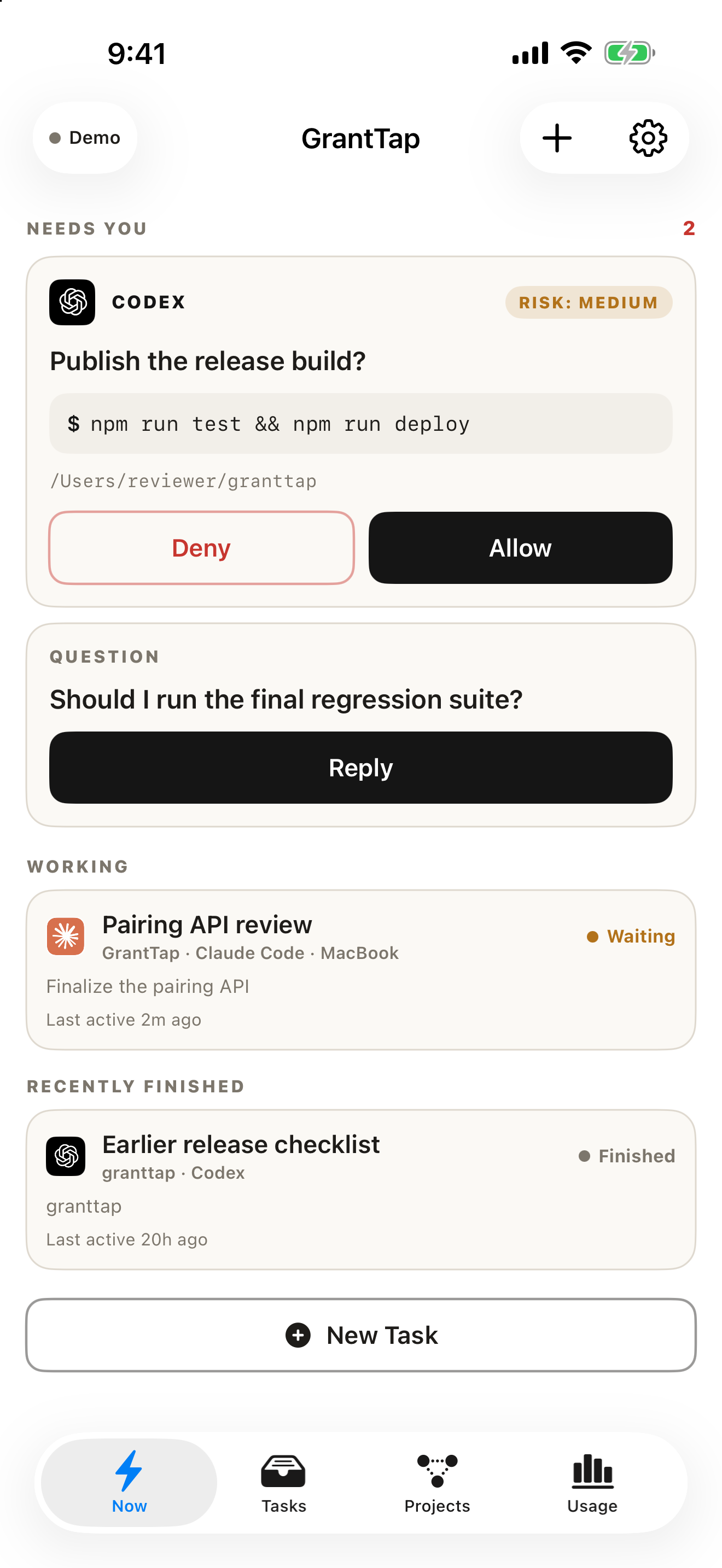
After pairing, look for the computer in Connections and inspect its current readiness. A saved link means the devices have a relationship, not that Claude Code, Codex, a relay, every hook, and every approval path are currently healthy. Create a harmless test Task and ask the local agent to report a simple progress event. Confirm that the iPhone shows the right provider, computer, workspace, and delivery state. If one part is missing, check that part specifically. Do not infer a successful command from a task card that merely received a message.
Put work in one Project Mesh
A Project is GrantTap's coordination scope. Its Mesh binds relevant repositories, people, computers, rules, and Tasks. That gives one place to understand work even when a provider changes. It does not merge provider projects, grant repository access automatically, or copy full transcripts into a shared space. The bounded Mesh events include progress, questions, dependency notices, and conflict claims. Resource identity includes the repository, so two identical relative filenames in different repositories are not silently treated as one file.
For a first run, choose a single repository and one clear Task: for example, fix a failing unit test in a disposable branch. Start locally in Claude Code or Codex and observe it on the phone. When another execution appears, confirm whether it belongs to the same Task or a new user request. A child agent should remain nested under its provider execution. This arrangement helps the Now view prioritize Needs You, active work, and recent outcomes instead of filling the screen with unrelated sessions.
Make approvals meaningful
An approval on iPhone matters only when it reaches the computer before the sensitive tool executes. GrantTap's Project Governance lets a Project policy allow, ask, or deny capability kinds such as skills, MCP servers, shell, file writes, deploy, and network, with narrower named rules where supported. Global provider configuration can still deny an action, and that deny wins. Each computer reports the policy revision it applied and its enforcement coverage; an observed-only or unsupported path must stay visibly different from an enforced one.
The simpler personal approval modes also exist for supported task paths. Neither mode turns an unobserved provider-native route into a GrantTap-enforced route. In a test repository, request one harmless action that policy permits and another that policy denies. Inspect the host's response and the provider transcript. A phone card saying Allow records a decision; a completed tool result is separate evidence. The approval-boundary analysis explains how to test this distinction without touching real credentials.

Continue without inventing a transfer
The Task can survive a new provider session or target computer. A supported handoff carries bounded Task and git facts, decisions, blockers, an explicit destination, and a receipt from the receiving side. It does not ship hidden reasoning, a provider's private session state, or uncommitted files as if they were portable. Before moving work, check repository identity, target checkout, branch, local changes, and the destination tool's actual availability. The same branch name on another machine does not guarantee the same tree.
If the target is unavailable, show that as a routing failure or pending state. If a provider lacks a deterministic hook for a particular action, do not advertise remote blocking there. A completed handoff receipt says the next execution accepted the route; it does not prove the task's code change passed tests. These details are why the Task continuity guide treats transfer as an evidence chain. They also explain why one Project may need different policies on different computers even when its objective is shared.
Inspect usage and the outcome
GrantTap derives usage from native provider transcripts and local operating-system samples. A listed capability may be available but not allowed; an allowed capability may never be invoked. A reported invocation can have unknown resource use if the process was not sampled, and a reported successful edit request does not prove a changed file. The app must preserve these differences. The usage evidence guide gives a better reading of numbers than treating every visible row as a cost claim.
After the first end-to-end Task, verify the source tree and the test result on the computer. The phone helps you find what needs your attention and continue a bounded conversation, but the final technical evidence still belongs to the runtime and repository. If you use both Claude Code and Codex, repeat the test with each; if you add another computer, repeat the pairing and checkout check. That small routine exposes real integration gaps early and makes the control center more useful than a collection of attractive status cards.