
GrantTap legal and support
Support
Last updated:
Install GrantTap → connect an execution computer with GrantTap MCP → open your Task. This guide explains account passkeys, direct pairing, Mac access, connection modes and recovery.
Account passkey and QR
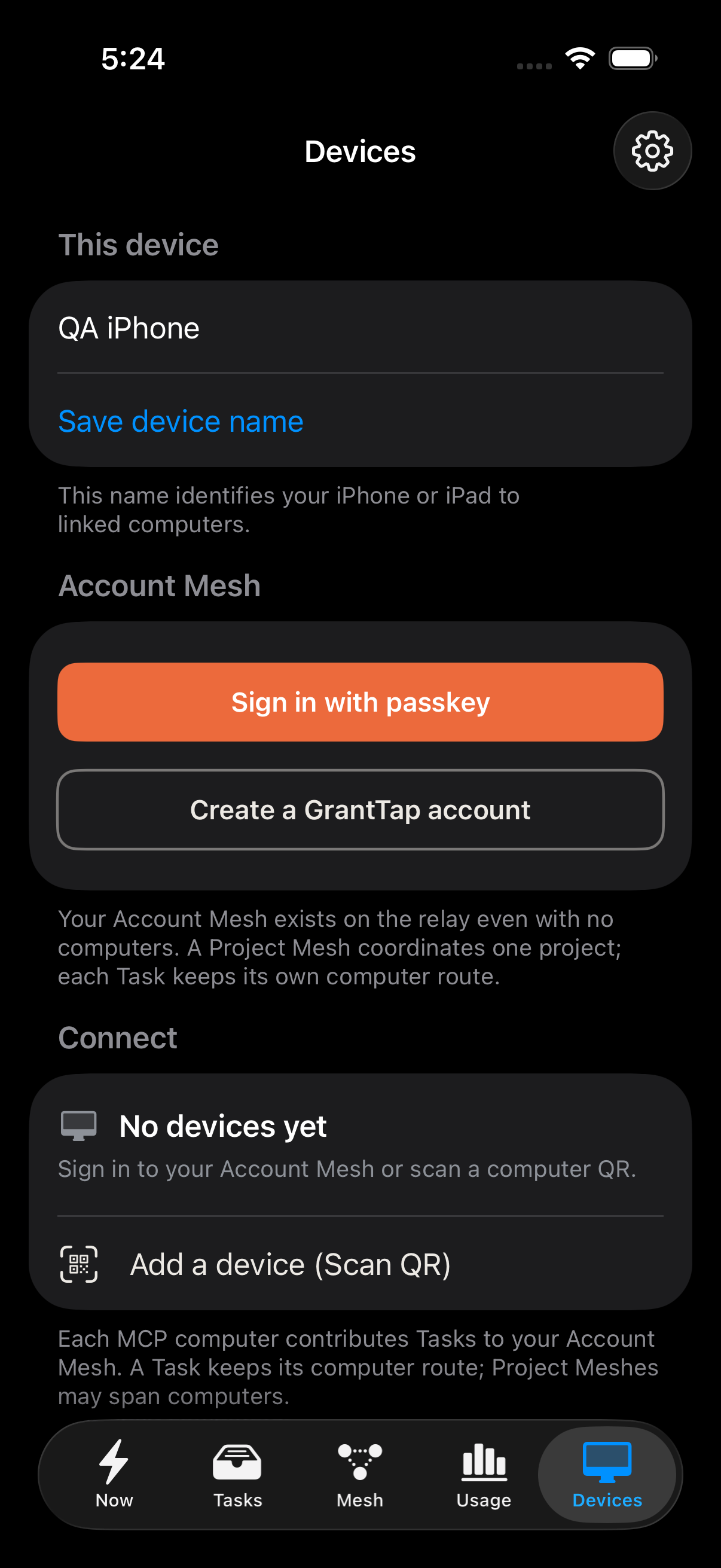
An Account Mesh exists as soon as you create or sign in to your Personal account, even with no computer. It can contain many Projects and their Meshes. Use the same passkey in GrantTap MCP to add a computer. Every linked computer running MCP contributes its own Task catalog to the account; each Task keeps its computer route. On a trusted iPhone, Devices → Add another iPhone or iPad offers a five-minute, one-use Account Mesh QR for a new device. It creates a separate session and discovers all linked MCP computers, including computers added later.
The same screen can request a QR for one computer. A Project Mesh invite has its own role and permissions; it does not open the whole account. A GrantTap passkey is not Sign in with Apple. Apple Passwords can sync it through iCloud if you save it there.
On a Mac with the local GrantTap bridge, granttap.com/connect can request a fresh passkey assertion to approve one coding-app connection. The Mac must still authorize its local MCP bridge. You can review and revoke account devices in the account page.
To sign in without a passkey on this device, choose Devices > Sign in with token and paste a private GrantTap token or link. Opening a link asks you to confirm; it does not sign in automatically. In a passkey-connected account, Devices > Sign-in tokens creates a named token with an expiry and sign-in limit, shares its link, and revokes it. Revocation also ends its account sessions. Existing QR pairings remain independent. Token access does not sign in to coding providers and cannot create more tokens or enroll a new computer.
Mac app and device connections
- Open Help → GrantTap Help for built-in guides. GrantTap → About GrantTap shows the version, purchase options, Terms, Privacy and licenses. These documents remain readable offline.
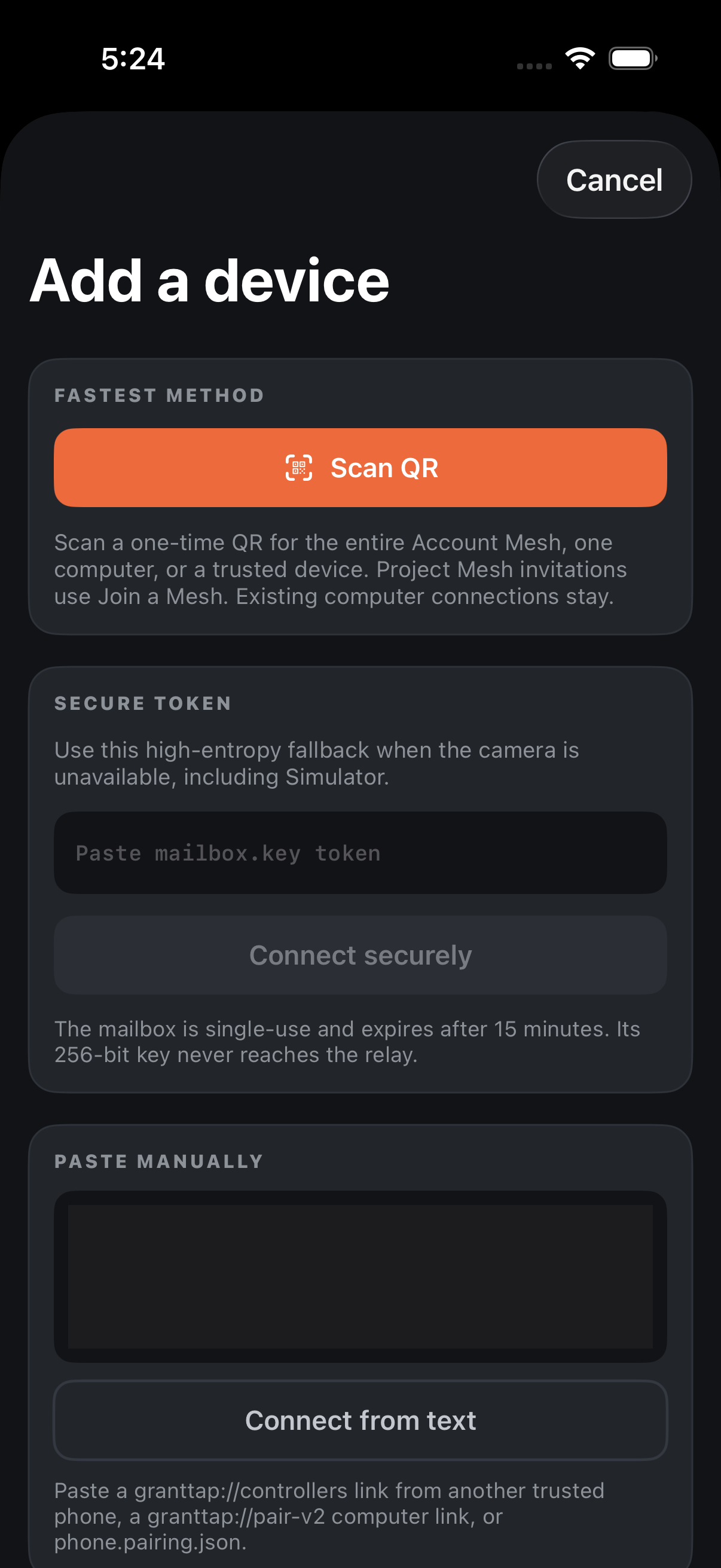
- In the Mac app, open Devices → Connect iPhone or iPad for a one-time QR. On the phone or tablet, open Devices → Add a device (Scan QR).
- To add a Mac or PC, choose Connect a computer by link and paste its one-time invitation. Existing device connections are preserved.
- Install MCP on each computer that runs coding agents. A Mac used only to manage linked computers does not need a local MCP. Local Mac control additionally requires approved local access.
Purchase, restore and connection modes
Planned US launch prices: Personal: $4.99 per month — up to 2 computers; Personal Plus: $7.99 per month — up to 5 computers; Fleet: $13.99 per month — up to 15 computers. Mac Local: $39.99 once. Apple’s purchase sheet controls availability, local pricing and any eligible trial. Models and AI tokens are separate.
Use Restore purchases in Settings with the same Apple Account that made the purchase. Manage subscription opens Apple's controls. Deleting the app does not cancel a subscription.
Active Personal includes linked Mac managed access; no additional Mac Local purchase is required for that path. Mac Local opens local control and your own relay without a Personal subscription. Managed hosting is not part of the one-time purchase.
Connect a computer
- Install Node.js 22 or newer.
- Run npm install -g granttap-mcp.
- Run granttap setup. It detects providers, installs supported hooks, and starts or repairs the helper.
- Open the GrantTap connection card in the coding app and choose Add a device. Scan its one-time QR in GrantTap on iPhone.
- Use Add another device for a second phone or Reconnect for the same phone. granttap.com/connect handles coding-app approval and observations, not the QR.
- Use granttap status for a read-only readiness summary.
Provider readiness
- Claude Code and Codex are the primary integrations.
- Codex may require you to trust the exact GrantTap hooks before restarting Codex.
- For Cursor, install the GrantTap Marketplace listing, then run granttap setup. Its supported controls are described in the Cursor guide. Do not add GrantTap in Customize → MCPs.
- Grok Build controls depend on what the installed local runtime exposes.
- Cursor Cloud · fetch failed is a leftover user HTTP MCP at 127.0.0.1:17342, or the unused cloud plugin source — not proof the phone is unpaired.
- A provider that is not installed is not an error.
Pairing or delivery does not work
- Check the task computer is awake, its MCP is running and the expected account or direct pairing is selected. Run granttap status before changing pairings.
- Confirm internet access and use a wss:// relay URL.
- Relay connectivity and computer availability are separate. A returning device can receive saved encrypted catalogs, Mesh and recent chat heads from a compatible relay while its computer is offline. New execution and history not yet published still require that computer.
- The Account Mesh combines Tasks from all linked MCP computers. Reconnect repairs the affected computer link; it does not switch all chats to a default computer.
- Check iOS Notifications and Background App Refresh. APNs timing is controlled by Apple and cannot be guaranteed.
- Never send pairing tokens, room credentials, provider credentials, prompts, or repository paths in support messages.
Choosing managed, direct or own relay
Managed mode uses GrantTap delivery and an active Personal entitlement on the same account. A linked Mac can act as a managed client without a separate Mac Local purchase. Only computers enabled to publish agent work use the plan’s computer allowance.
Mac Local is the separate one-time right for local Mac control and your own relay. Direct mode uses encrypted endpoint discovery; your own relay uses your endpoint. Neither mode makes a private computer reachable through NAT automatically. Supply a reachable TLS endpoint or a suitable VPN and maintain your server, updates and backups.
Push requires a working push service and Apple permissions. A custom relay address alone does not configure APNs or guarantee background delivery. Keep tokens and private endpoints out of support screenshots.
A second iPhone or iPad
For your own linked clients, open Devices on a trusted signed-in device and choose Add another iPhone or iPad. Scan the account invitation on the new device before its displayed expiry. The new device gets its own revocable account session and discovers account computers.
A QR for one computer is a different operation. On Mac use Devices → Connect iPhone or iPad, then on the phone Devices → Add a device (Scan QR). For an existing device use Reconnect; do not create a new pairing as a routine repair.
Inviting another person to a Project Mesh grants the selected role and project access. It does not share your whole account, provider subscription, source-hosting credentials or Mac Local license.
Models, Effort and Usage
Open the model control beside the composer. Select the provider-reported model and, when supported, its Effort level. These settings apply to the next message sent from GrantTap; unsupported levels are not added to a provider.
Subscription limits and reset times come from the provider account. Token and tool statistics are separate observed execution data in Usage. Missing or stale information is marked unknown; GrantTap is not the provider’s invoice. Your AI accounts and model charges remain separate.
Sending, queueing and scheduled work
Open the intended Task and check its computer and provider before sending. Its route stays with that Task. A different active computer in Devices does not silently move an existing chat.
After the encrypted upload is confirmed, the relay can retain a queued request until its due time or expiry and deliver it when the target computer reconnects, even if the phone is closed. Before that confirmation, keep GrantTap connected so the local pending upload can finish. Queue limits, expiry, revocation and available provider operations still apply. Compatible Apple clients can rebuild the local queue from the relay using the existing pairing; closing the app does not cancel confirmed queued work.
Use Queue to inspect, change the supported delivery time or cancel a waiting request. Retry acts on failed delivery; it is not proof the agent completed the work. If an acknowledgement is uncertain, inspect the Task before creating another copy of the same request.
Stopping work and attachments
Stop is available for a provider-reported active execution that supports interruption. Closing the chat or locking a device does not stop the agent. Waiting messages have their own queue controls.
Keep the app connected until an attachment upload is confirmed. If a picture shows Retry, reopen it while the task computer and the authorized connection are available. A file preview requires workspace access on that Task’s computer. An edit request sent from GrantTap is applied through the supported computer/provider path; it is not an unconditional local overwrite.
Health and Graph
Repository analysis runs on the execution computer and requires the installed GrantTap Engine. Keep both Apple clients and GrantTap MCP current; MCP 0.8.68 or newer supplies the repository and architecture contract used by recent clients.
In Mesh → Health, check the computer, repository binding and timestamp. Refresh requests new evidence; a cached snapshot is not a live connection. If a repository was moved or its remote changed, review that binding instead of deleting all pairings.
A graph can be incomplete when analysis is bounded or a language is unsupported. The plan does not turn missing evidence into a complete architecture report. Send sanitized error codes and versions to Support if a current report still fails.
Purchases confirmed but access not active
Do not buy a second time after Apple confirms a purchase. Reconnect to the same GrantTap account, check internet access and use Restore purchases to retry verified purchase and account synchronization. Support can investigate a persistent activation error without your Apple password or payment-card details.
An Apple billing account and a GrantTap passkey account have different roles. Use the purchasing Apple Account for restoration and the intended GrantTap account for shared managed access. Ending Personal does not delete downloaded chats or revoke a purchased Mac Local license.
Apple Watch
Install the companion through the paired iPhone. Watch displays synchronized work and sends supported quick decisions through that phone. It is not an independent coding computer or a separate paid plan.
Check the iPhone’s connection and Apple notification permissions first. APNs and Watch background timing are controlled by Apple. Decisions still require the request to be current and allowed by project and computer policy.
Approvals and safe access
Task controls apply only to supported actions and the stated execution. A global capability deny still wins over task preferences and auto-accept. Full-access wording does not grant rights to another user’s computer or repository.
Never share a live QR, passkey recovery material, provider tokens or pairing credentials. Remove a lost device through the account/device controls. Forgetting a device and cancelling a subscription are different actions.
Choose managed publishing computers
Open Subscription → Managed computers in the Apple app, or the Computers section of your GrantTap account on the website. Sign in with the same passkey. Turn publishing off to free a managed place without deleting the computer, its pairing or downloaded history. Heartbeats do not re-enable that choice; use the publishing control to enable the computer again. Previously issued relay access can last up to five minutes before expiring.
Version history
The iPhone, iPad and Mac apps are available by TestFlight invitation. Find the build number in About. The computer MCP updates separately.
- Apps 209 · TestFlight · October 21, 2026. Selected source sections retain their colours. Neutral file lines no longer appear as functions or overwhelm the measured sections. Short files fill the inspection area; zoom uses small reversible steps and cancels delayed camera movement. Map settings group colour, source context, labels and links, with measured-check counts. Graph separates Code map, Architecture and Report details.
- MCP 0.8.86 · October 21, 2026. Chat catalog scans yield to relay traffic, reconnects publish a fresh catalog, and Usage history no longer delays the next chat update. Repository checks run asynchronously with bounded Git concurrency. Saved transcripts remain readable while scans refresh.
- Apps 208 · TestFlight · October 21, 2026. Health separates current partial reports, saved evidence and actual refresh failures. Added filters, sorting and diagnostics. Empty filters can be cleared in the list. The code city has an independent Legend and controls for section kind, size, static function checks, labels and links. Function results and measurements appear before long report provenance. Panels leave camera controls available.
- MCP 0.8.83 and Engine 0.1.2 · October 21, 2026. Fixed analysis of retired checkout bindings and current Git revision detection. Ignored service folders stay outside analysis. Bounded reports retain measured functions and representative symbol kinds. Green and red describe selected static checks; unmeasured code remains unknown, and a partial map is not presented as a complete analysis.
- Apps 207 · TestFlight · October 21, 2026. The code city opens in Repo Lens without an early switch to the old view. Towers retain their measured source lines when only a few sections are reported; known sections and the remaining source body stay distinct. Fixed report loading and reloading, with verified portrait and landscape inspection.
- MCP 0.8.82 · October 21, 2026. Large graph reports preserve source sections by reducing dense link data first. The map keeps real section names, kinds and locations instead of losing them when a report must fit its delivery budget. Updated dependency notices.
- Apps 206 · TestFlight · October 20, 2026. The offline Repo Lens code city now includes readable sections, directed links, file and symbol search, recovery and layouts for iPhone Duo, landscape, iPad and Mac. Saved graph and code city actions remain usable across their full rows while analysis refreshes. Health distinguishes current, saved and partial reports; scrolling remains responsive during frequent Mesh updates. Effort dragging preserves continuous native movement and snaps to a supported level on release. Updated monthly plans: Personal $4.99, Personal Plus $7.99, Fleet $13.99, with an eligible seven-day subscription trial. Added optional cancellation feedback and an eligible one-month offer at about half price, once per account; Apple confirms localized prices and regular renewal. Full TestFlight access remains free without a subscription.
- MCP 0.8.81 · October 20, 2026. Complete installation, account, connection and message delivery guide. Updated Personal $4.99, Personal Plus $7.99 and Fleet $13.99 pricing. Clarified the trial, free TestFlight access, provider limits and connection recovery.
- MCP 0.8.80 · October 19, 2026. Reconnection respects the retry delay returned by a congested relay. Pending encrypted messages survive reconnects; relay storage and an agent response remain separate delivery stages.
- Apps 205 · TestFlight · October 19, 2026. Cancel a failed delivery in its chat or Needs You. Native transcript confirmation retires sent messages; old timers and receipts cannot revive them after Retry. Submitted legacy queue entries offer a history check without resending. The robot button is named Agents, and its list updates while open.
- MCP 0.8.79 · October 19, 2026. Fixed Codex agents with inherited parent history. They retain their own IDs and relationship to the parent Task. Copied parent history is excluded from each agent conversation.
- MCP 0.8.78 · October 19, 2026. Phone messages continue the same open Codex chat, including during a response. Fixed conflicting attempts to start that chat. Repeating the same submission does not start the turn again. Pause sends the stop request to that chat; attached files remain available to the agent after message admission.
- MCP 0.8.77 · October 18, 2026. Cursor approvals continue the original Task, whose history remains readable during a request and after restart. Health automatically prepares the bundled Engine on Mac and Linux x64; graphs recover when the Engine starts without delaying chat access.
- Apps 204 · TestFlight · October 18, 2026. Tapping a notification opens its approval or question. Card swipe gestures no longer intercept vertical scrolling in Now and Tasks. Fixed retry after a computer refusal and duplicate computers in Mesh. Cursor variants are grouped by family with higher reasoning levels first. The computer MCP update is published separately.
- Apps 203 · TestFlight · October 18, 2026. Mesh persistence runs in the background and coalesces frequent updates. Health and chat history remain responsive while snapshots save; pending writes finish before the app suspends.
- Apps 202 · TestFlight · October 18, 2026. Messages and queues in a new chat save to the relay before the computer opens its task. Chat ID changes and repeated Send now preserve delivery state. Update the computer MCP to 0.8.75 for this behavior.
- MCP 0.8.75. Queued follow-ups wait for the original task and continue that chat after the computer returns. Controller, provider and Project checks remain in place; repeated delivery does not create a second task.
- Apps 201 · TestFlight · October 18, 2026. Full beta access without buying a subscription. Approvals and messages confirm relay storage without waiting for the computer. New queue uploads do not wait behind older receipt requests. Adaptive chat for iPhone Duo, rotation and the keyboard.
- Apps 199 · TestFlight · October 17, 2026. Transfer offers Claude Code, Codex and Grok Build models and reasoning effort. Claude or Codex cloud transfers run through the source computer with MCP 0.8.72. Fixed repeated reconnections after relay admission is refused.
- MCP 0.8.74. Cursor questions, answer choices and visible warnings reach GrantTap. Retained Cursor chats open without waiting for the working-tree check. Transfer preparation supports committing changes before handing off a task.
What counts as a computer?
One stable computer enabled to publish agent work through the managed service. Multiple agents and projects on it do not use extra seats. iPhone, iPad, Watch and controller-only Macs do not add execution-computer seats.
Do I need Personal and Mac Local?
Not for managed mode. Active Personal provides managed access to your linked Mac. Mac Local is the separate one-time purchase for local control and your own relay.
Are AI models and tokens included?
No. You use your own provider accounts and plans. GrantTap manages supported executions; it does not replace a model subscription.
What remains after cancellation?
Paid access continues until the stated date unless the entitlement is separately revoked. Downloaded local history, chats and images are not deleted. A purchased Mac Local license remains valid.
Open Settings → Subscription → Manage or cancel in the app, or Manage or cancel with Apple in your account on the website. The Apple settings link is available immediately. Cancel a free trial at least 24 hours before it ends to avoid renewal.
Eligible existing subscribers can check the app for one month at about half the regular monthly price, once per GrantTap account. Apple confirms the localized promotional price and the regular monthly renewal before purchase. Offer availability is checked with Apple; TestFlight keeps full free access.
You can optionally choose a reason or send a comment. Feedback is separate from cancellation, is encrypted at rest, is kept for up to 90 days, and is removed with your account.
Is Fleet a team plan?
Fleet increases your managed-computer allowance. It is not an enterprise package, an SLA or a fifteen-person license. Supported Project Mesh collaboration remains available.
Do I pay separately for Apple Watch?
No. Supported Watch actions work through your paired iPhone. The watch is not a standalone execution computer.
Contact and diagnostics
Email sergii.ziborov@gmail.com with app, iOS/watchOS, Node.js, helper, and provider versions plus sanitized reproduction steps. Export diagnostics from the app's Troubleshooting destination when available.