
GrantTap guide · · 10 min read
Messages that wait for the computer
A queued request can wait on the encrypted relay until its computer reconnects, even with the phone closed. What each mark on your message means, what the relay can see, and where waiting stops.
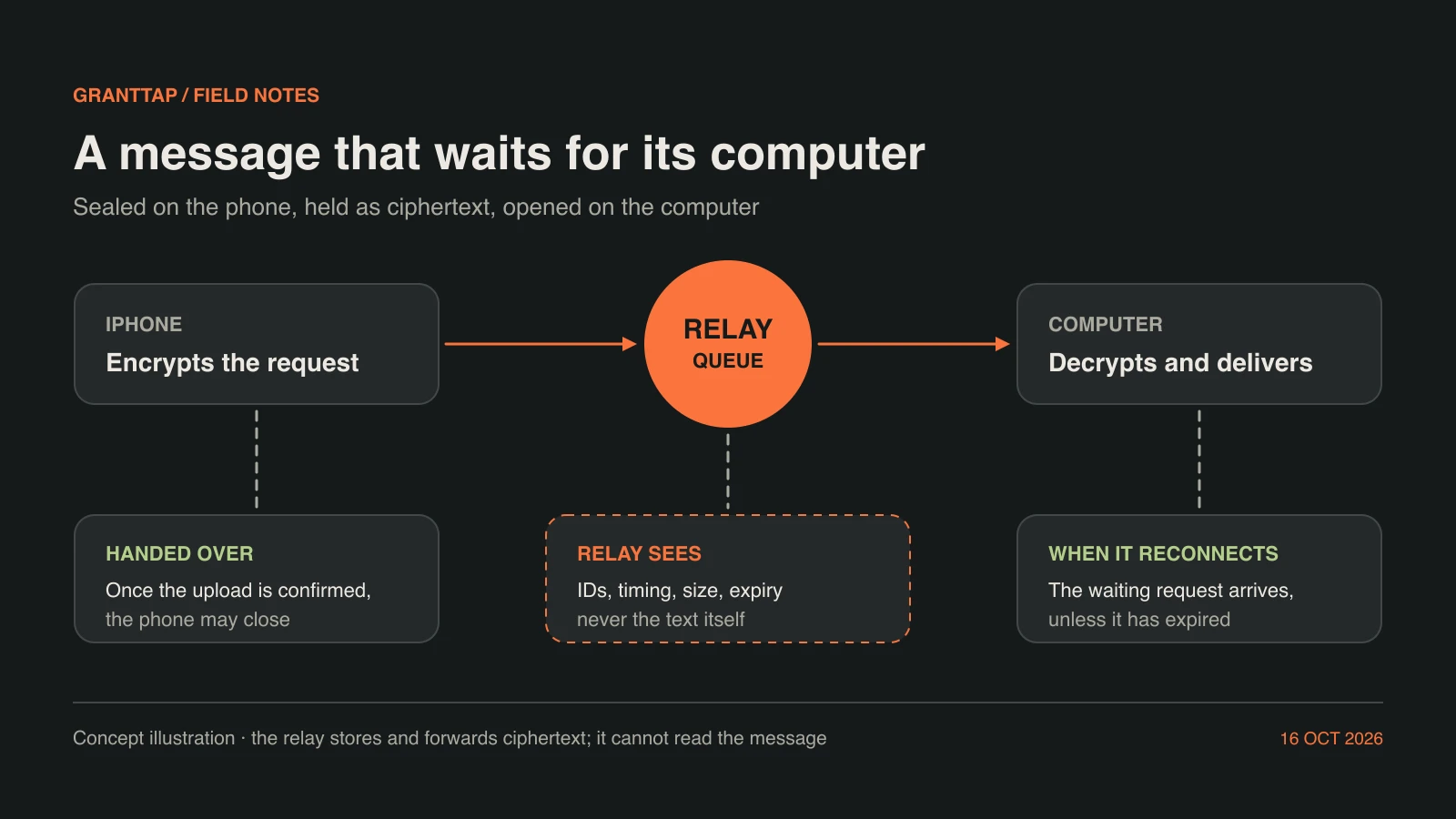
The computer that runs your coding agent is not always reachable when you think of the next instruction. A laptop is closed in a bag, a desktop at home has gone to sleep, or the agent is still finishing a long turn and you would rather it saw your request afterwards. Keeping the phone open until the computer comes back is not a workflow. GrantTap lets a request wait for its computer instead: a queued request is sealed on the phone, held by the relay as ciphertext, and opened by the computer when it reconnects, even if the phone has been closed in the meantime.
Waiting only helps if you can tell what happened while you were away. GrantTap keeps three facts apart: the phone handed the message over, the computer confirmed it, and the agent did the work. This guide explains how a message travels, when the phone can let go, what each mark on your message means, what the relay can and cannot see, and where waiting ends. Everything here is also stated in GrantTap's Help, Security and Privacy pages; this story puts those pieces in the order you meet them.
Every message has one route
A message in GrantTap belongs to a Task, and a Task belongs to one computer and one provider. Before you send, open the intended Task and check that pair. The route stays with that Task. Choosing a different active computer in Devices does not silently move an existing chat, and a waiting request will not be delivered to some other machine because it happens to be online. That is the point of waiting: the request is for this Task's computer, with this Task's checkout and agent, and nowhere else.
The same rule makes a waiting message safe to leave. If the request could follow whichever computer answered first, a sentence written for one repository could land in another. Because the route is fixed, the only question while you wait is when the right computer becomes reachable, not where the message will end up. If you meant to send the work elsewhere, that is a transfer of the Task, a separate step with its own checks, not a side effect of a message sitting in a queue.
Sealed on the phone, opened on the computer
GrantTap's devices create and store their keys locally, including a separate key for each Task, and one Task's key cannot decrypt another Task. Your phone encrypts the message, its attachments and any decision it carries before anything leaves the device. The relay receives an authenticated nonce and ciphertext. Readable prompts, commands, replies, attachments and decisions exist only on the endpoints you authorized: your phone, your other paired controllers and the computer that runs the Task.
This is what makes it reasonable for a message to wait somewhere other than your own devices. The relay can hold a request for as long as it waits without being able to read it, and it has no browser approval, pairing, vault or plaintext rendering endpoint in the Personal service. When the computer reconnects it decrypts the request with its own key and hands it to the provider through the local helper. Waking a device does not reveal the request either: a push notification carries a generic wake with no Task content.
Two ways a message can wait
A message sent the ordinary way travels live. If the computer can be reached, it is delivered within moments. If it cannot, the message stays in your phone's outbox, marked as queued, and the phone tries again on its own. In that case the phone is still the one holding the work. The message is kept on the phone for a limited time, even across an app restart, but it does not move until GrantTap is connected again and the computer can be reached.
A queued or scheduled request is meant to wait without you. Once its encrypted upload is confirmed, the relay can retain it until its due time or expiry and deliver it when the target computer reconnects, even if the phone is closed. You choose this path when the timing is the point: an instruction for the agent after its current turn ends, a test run for a computer that will wake up later, or a follow-up you want to hand over before you go offline. Both paths end at the same place, the Task's computer, but only the second lets the phone step away early.
The moment the phone can let go
The handover has a precise boundary. Until the encrypted upload of a queued request is confirmed, the request is still pending on the phone, and GrantTap needs to stay connected long enough to finish that upload. After the confirmation, the relay holds the ciphertext and the phone's part is over. You can lock the screen, close the app or lose signal; the request does not depend on the phone again until a reply comes back. If the app closes before that confirmation, the request has not reached the relay yet; open GrantTap again and let the upload finish before you rely on it.
On the other side, the computer collects what was waiting when it reconnects. GrantTap's offline ciphertext queues are kept until the computer acknowledges that it decrypted the item, where that acknowledgement is supported, so a request is not dropped merely because the computer went away again halfway through receiving it. Closing a chat or locking the phone does not stop an agent that is already working, and waiting requests have their own controls in Queue, separate from Stop.
What the marks on your message mean
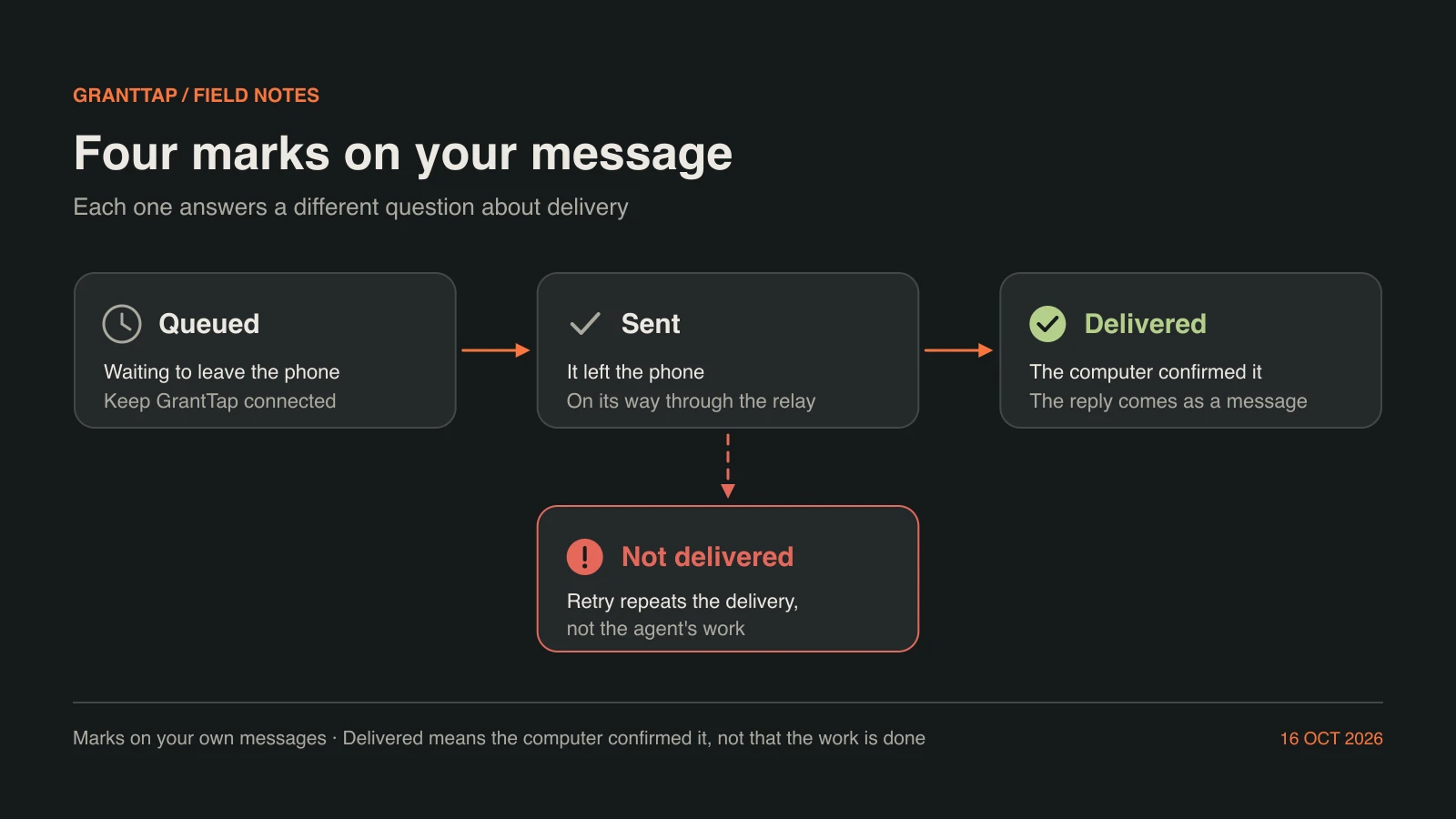
Your own messages carry a small mark, the way a messenger shows delivery. A clock means Queued: the message is waiting to leave the phone. A single tick means Sent: it has left the phone and is on its way through the relay. A filled tick means Delivered: the computer confirmed that it received the message. A red exclamation mark means Not delivered, with a Retry button beside it. Only a failure is coloured, so a long conversation does not shout on every line while things are going normally.
The marks follow real events rather than timers. A delivery attempt that fails goes back to Queued and is tried again automatically a limited number of times; only when those attempts are used up does the message become Not delivered. Delivered is set by a confirmation from the computer, not by the relay accepting the ciphertext. The account page and the website can show that a computer is registered or online, but that label confirms registration, not that a particular chat message arrived. The mark on the message is the one that speaks for that message.
Replies arrive as messages, not as marks
Delivered answers a narrow question: did the computer receive this request? It does not say that the agent has finished, or even started, the work. The agent's answer comes back the way every answer does, as messages in the same Task conversation: progress, a question for you, an approval request, or a final reply. Those arrive encrypted through the same relay and appear in order with your waiting request, so you can read what happened in the sequence it happened.
This separation matters most when you come back after a long wait. A filled tick with no reply below it means the request reached the computer and the agent has not answered yet, which is different from a message that never arrived. A reply that asks a question means the work is paused on you. A final reply is the agent's account of the result, which you still check against the changed files and tests. Delivery, execution and a verified result are three separate facts, and the conversation keeps them visibly apart.
What the relay can see
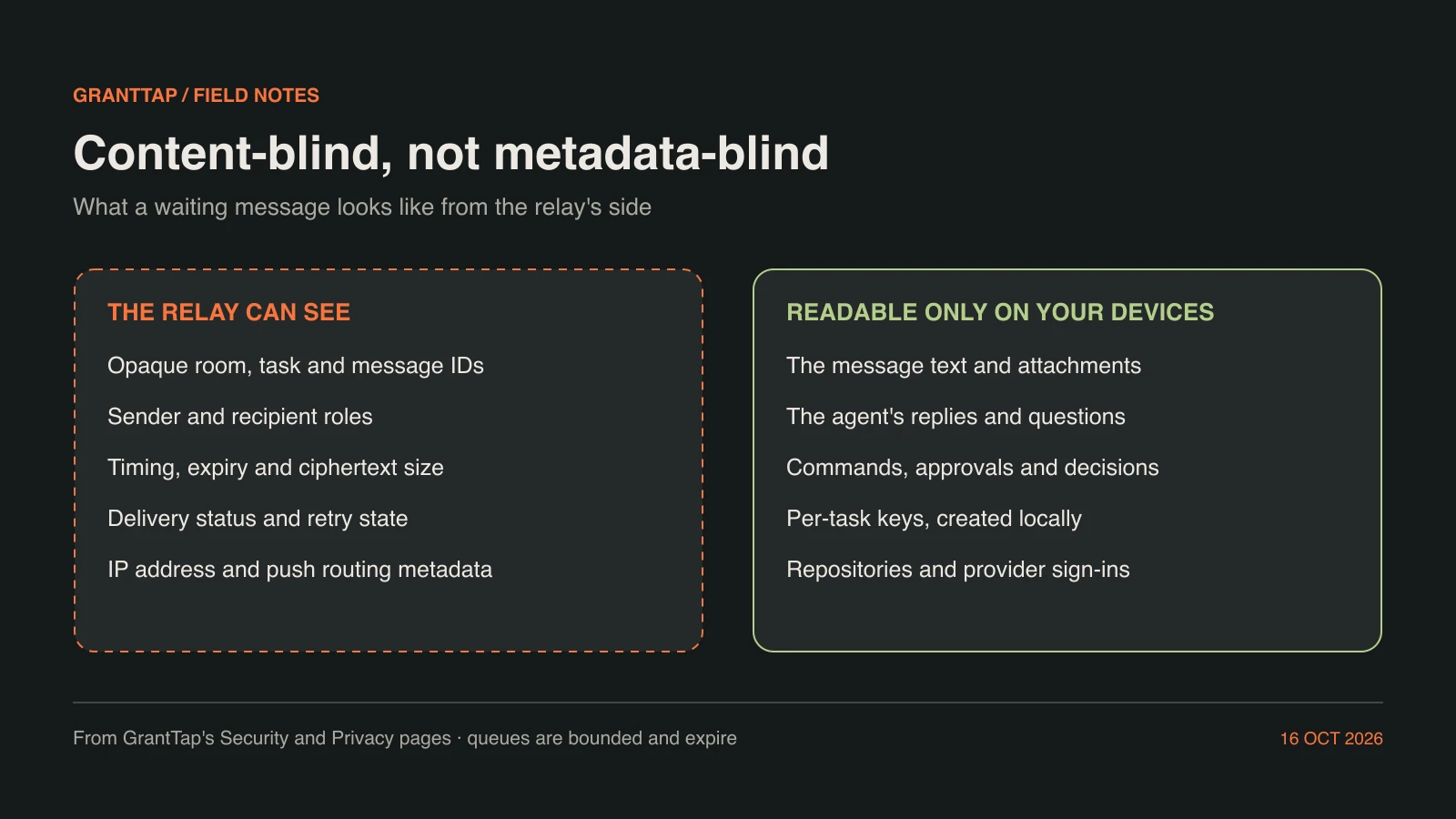
The relay is content-blind, not metadata-blind. It needs some information to route and expire messages, and GrantTap's Security and Privacy pages list it: opaque room, Task, message and delivery identifiers; sender and recipient roles; timing and expiry; the size of the ciphertext; delivery status and retry state; IP addresses and the routing data needed for push notifications. Every connection and push registration also requires the room's random credential, so knowing an identifier is not enough to join a room.
What the relay cannot see is the content: the text of your request, its attachments, the agent's replies and questions, the commands and decisions inside them, and the per-Task keys that would open them. Source repositories, workspaces and provider credentials never pass through it at all; they stay on the computer. Metadata still describes your activity, so treat timing and size as visible to whoever operates the relay you use.
Where waiting ends
Waiting is bounded on purpose. Offline ciphertext queues have limits and expire, so a request does not sit on a server forever. A queued request is retained until its due time or its expiry, whichever applies, and queue limits, revocation and the operations the provider supports still apply when it is delivered. Revoking a computer's or a device's access applies to waiting work as well. A request that expires before its computer returns does not start later by surprise; it expires without starting.
You remain in charge of a waiting request. Queue lets you inspect it, change its delivery time where that is supported, or cancel it before it is delivered. Stop is a separate control for an agent that is already running and supports interruption; a request that is still waiting is managed in Queue instead. When the computer does come back, the request is delivered in its place in the Task, and the marks and replies described above tell you what followed.
Retry, cancel or wait
Most of the time the right action is to wait. A clock means the phone still holds the message and will send it when it can; a request already handed to the relay is listed in Queue until its computer takes it. Use Retry only on a message marked Not delivered. Retry repeats the delivery; it is not proof that the agent completed the work. If an acknowledgement is uncertain, for example because the phone lost its connection just after sending, open the Task and read the latest messages before you create another copy of the same request.
Cancel through Queue when the plan changed, and check the Task's computer and provider before you write the next request. If the agent's reply is missing after Delivered, look at the Task for a question or an approval waiting on you before assuming anything failed. These habits keep waiting cheap: one request, one route, a mark you can read, and a reply in the same conversation. The phone can go offline in between, and the facts are still there when you come back.