Continuity · · 12 min read
Move a Task to another agent without losing work
A Task can continue with another agent or on another computer. Uncommitted changes now raise a warning instead of blocking the move, a local checkpoint can keep them, and the destination confirms before the new chat opens.
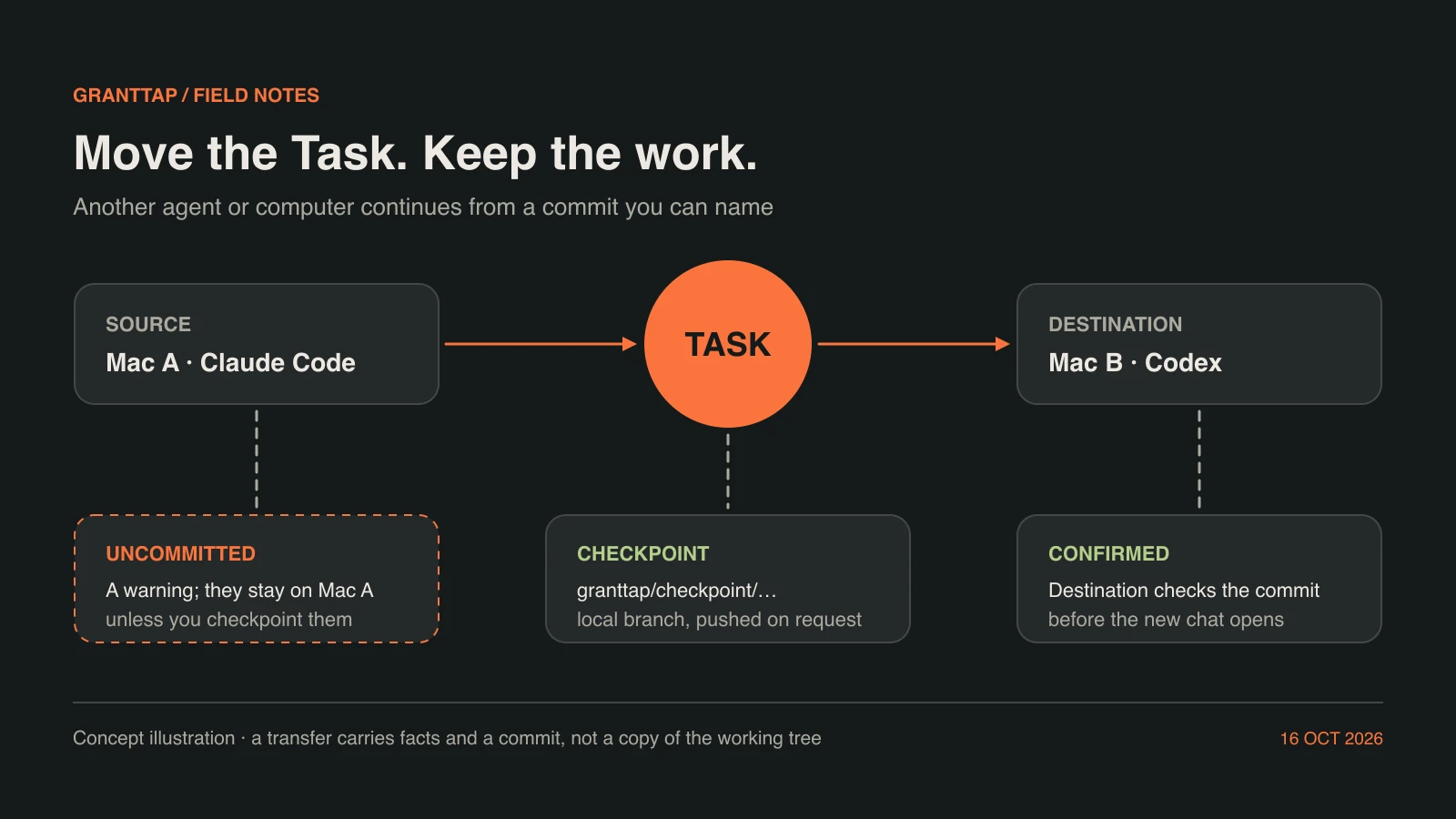
Work on a coding Task rarely ends where it started. A model reaches its usage limit in the middle of a refactor, a laptop has to close for the night while a desktop stays on, or a different agent is better suited to the remaining tests. Opening a fresh chat and pasting a summary loses the structure that made the work safe to continue: which commit it stands on, which files were changed but never committed, which decisions were already made, and which parts are still open. GrantTap keeps the Task as the stable unit and lets you move it to another agent or another computer, while the facts it carries and the checks it runs stay visible on your phone.
This guide follows one transfer from both sides: what you see and decide, and what each computer does. It also covers a change in GrantTap MCP 0.8.70. Uncommitted changes no longer block a transfer. They raise a warning, they stay on the source computer, and you can choose to save them to a local checkpoint branch first. The destination then confirms the prepared transfer before its new chat opens. We describe what the runtime does today and name what a transfer still does not do.
A Task moves; a new Execution begins
In GrantTap a Task is the goal you follow together with its visible history. An Execution is one native agent session working on that Task, on one computer, with one provider. A transfer does not rewrite the old session or pretend to be it. The source Execution stays what it was; the destination starts a new native session in a worktree of its own, and the Task links the two. The conversation you open afterwards belongs to the same Task, so its earlier messages, decisions and changed files remain where you expect them instead of being scattered across unrelated chats.
You choose the destination computer and agent on the phone. A Task can go to Claude Code, Codex or Grok Build when that agent is installed and switched on at the destination; the phone offers only the agents that computer has enabled. Grok Build can receive the work, although it has no trusted caller hook yet, so it does not publish scoped Mesh events of its own the way Claude Code and Codex do. For Cursor, GrantTap does not claim a remote start. The destination can be another linked computer or the same one: on the same computer the Task continues with the other agent in a new worktree made from the last commit, and no push is involved. When a destination cannot start the requested agent, the transfer stops with a reason instead of quietly choosing another tool.
What travels, and what stays
The transfer is described by a bounded Task Capsule built from explicit facts rather than from a model's retelling. It names the Task's goal and status, the source and destination computer and agent, the repository, branch and commit to start from, changed files, dependencies and resource claims, the remaining work and the decisions that matter. You can pick one of the models the destination advertises and add a short note explaining why the work is moving. Both travel inside the encrypted capsule; the destination puts your note into the new session's opening message and starts the model you chose. The destination is also prepared with the Task's visible conversation and available attachments, so the next agent can read what you could read in the chat rather than a summary of it.
What does not travel is just as specific. Hidden reasoning and a provider's private session state stay with the provider that produced them. The working tree is not copied either, and no agent is installed on your behalf. The destination works from a commit it can actually check out. That constraint is what keeps the rest of the flow honest: a commit can be named, verified and fetched, while an unsaved edit on another disk cannot. Everything below is about making that commit the right one, and about telling you plainly when part of the work is not in it.
Uncommitted changes are a warning, not a wall
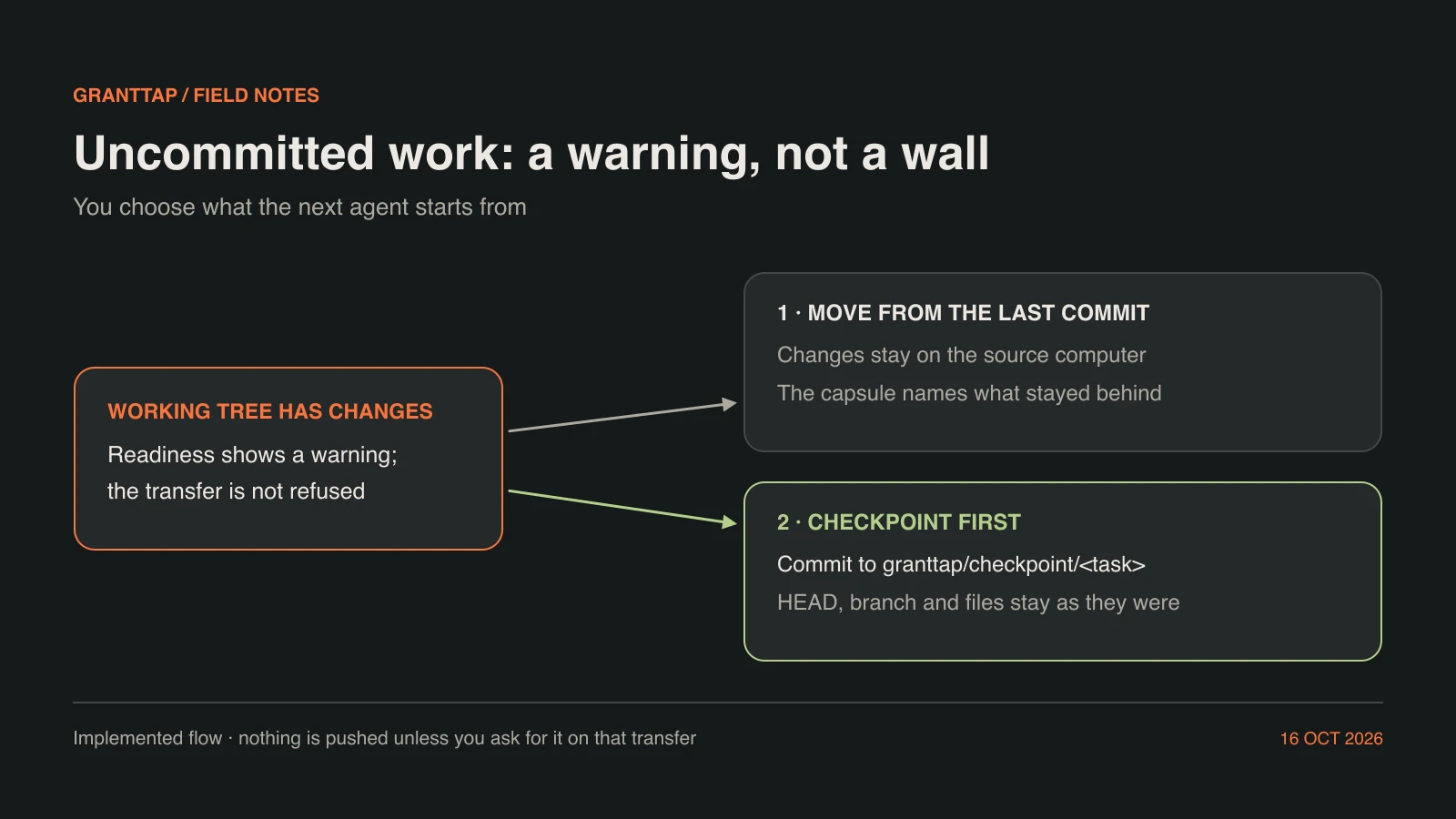
Earlier runtimes refused a transfer from a checkout with uncommitted changes. That protected the work, but it also stopped a person who knew the edits were scratch files or an abandoned experiment, and it forced a manual commit before every move. From GrantTap MCP 0.8.70 the readiness check reports uncommitted changes as a warning instead. On the phone the wording is direct: "This task has uncommitted changes. They stay on the source computer; the next agent starts from the last commit." The decision is yours, made with that information in front of you rather than taken away from you.
The warning is not a silent narrowing. The capsule tells the next agent which changes stayed on which computer and that they are not in its starting commit, so it can say so instead of assuming it has everything. "Uncommitted" is read from git status including untracked files, because a new file that was never added is work no commit would carry. If GrantTap cannot read the working tree at all, it says that uncommitted changes may stay behind and warns about it in the same way. An unanswered check is never treated as a clean one.
A checkpoint saves the changes without touching your branch
When the edits matter, ask for a checkpoint from the phone. The source computer commits the uncommitted work, new files included, to a local branch whose name starts with granttap/checkpoint/ followed by the Task, and the capsule carries that commit instead of the last one. The commit is built from a temporary index. HEAD, the current branch and the working tree stay exactly as the agent left them, so a session still open on the source computer does not find its files staged, moved or reset under it.
Two safeguards keep a checkpoint from becoming a leak or a mix-up. Files whose names mark them as secrets, such as an environment file or a private key, are left out and recorded as excluded, so the checkpoint is reported as partial rather than complete. Each checkpoint gets a branch of its own with a timestamp, so a Task handed on twice never moves an earlier checkpoint and leaves its commit unreachable. Because it is an ordinary local branch, you can inspect it with git log or git diff, merge what you want later, or delete it. Nothing about a checkpoint is published by itself.
Pushing stays your decision
Another computer can only start from a commit it has. The transfer sheet says so in one sentence: the other computer needs the commit, so push the branch or make sure it can fetch it. GrantTap does not push or fetch on its own initiative. A push happens only when you switch it on for that particular transfer, the switch appears only when the destination is another computer, and your choice does not carry over to the next transfer.
When you do switch it on, the source publishes the branch the capsule names, either the checkpoint branch or the current one, to the checkout's existing remote before the capsule leaves, and never by force. If the push fails, the transfer stops there rather than sending a capsule that points at a commit nobody else can reach. On the receiving side, a destination that lacks the commit fetches that branch once before it refuses. A transfer that stays on the same computer needs no push at all, because the commit is already present in the repository.
The destination checks before the chat opens
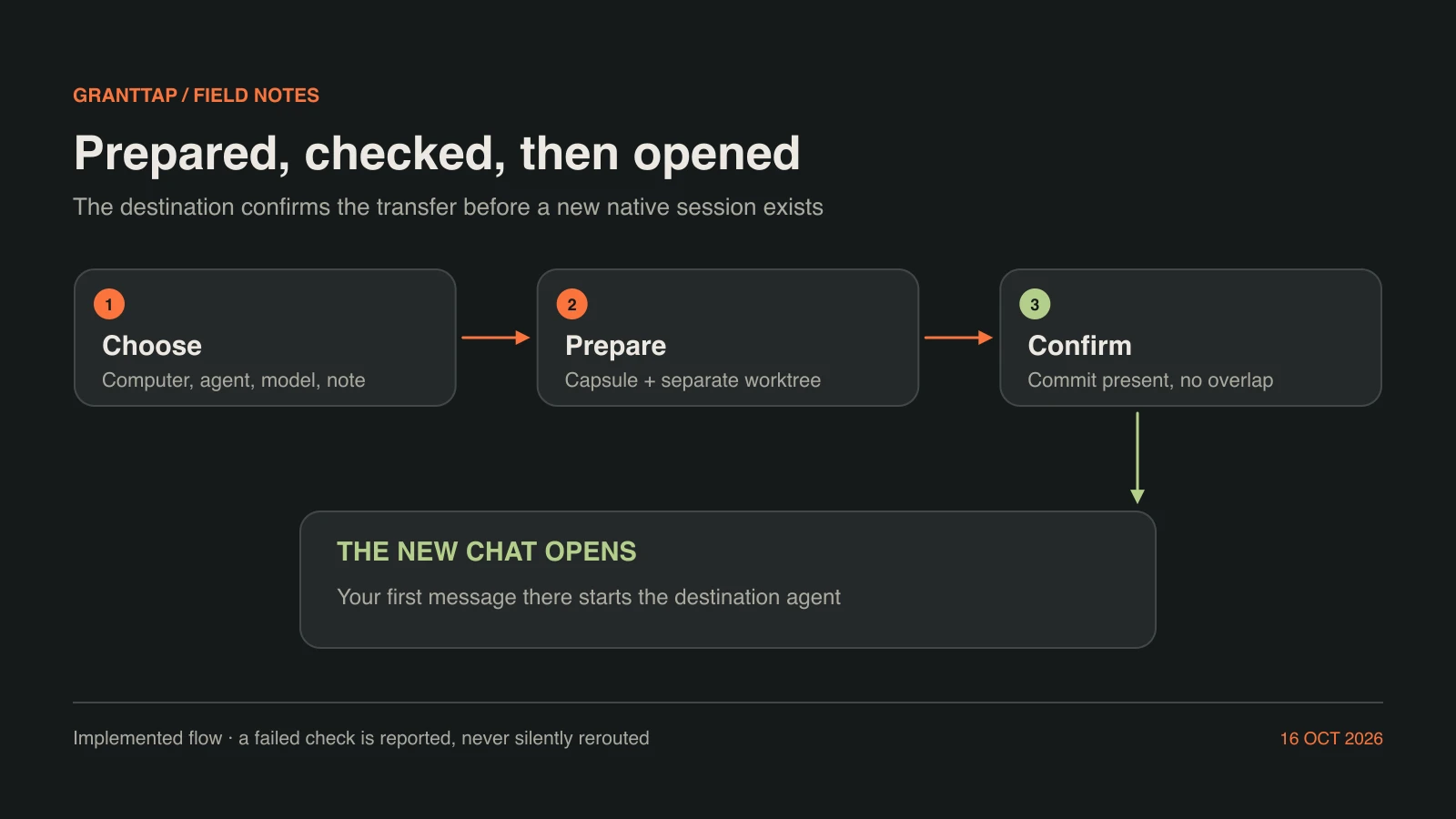
Choosing a destination is a request, not proof that it is ready. The source side first makes sure the agent is not in the middle of a turn: you pause it or let the turn finish, so the state you approve is not still changing. The destination computer then runs its own checks when the capsule arrives. Does an authorized local checkout match the project? Is the named commit present? Is the target agent enabled? Do the capsule's resource claims overlap the claims of another Execution working there? If any answer is wrong, it refuses explicitly and the reason reaches the phone instead of a half-started session.
A transfer to another computer is also confirmed only while the source checkout is still on the same commit, with the same uncommitted changes, as when you agreed to the move. Once confirmed, the destination prepares the Task: its stable identity and original title, an isolated worktree, the chosen agent and model, and the visible context. Missing or oversized context refuses preparation rather than dropping history without a word. Preparing does not invoke an agent. Your first message in the new chat starts one native session, and later messages resume the same session. A launch is recorded before the provider starts, so an interrupted first launch asks you to inspect the destination instead of creating a second session behind your back.
What you see on the phone
On iPhone a transfer starts from the Task. The transfer sheet asks for a destination computer and agent, explains the checkpoint branch, offers the push switch when the destination is another computer, and lists the readiness checks with their current answers: the repository, the working tree, overlapping resource claims and the target agent. A row with a problem says what it found. Uncommitted changes appear as a warning with the sentence quoted above, never as a block, and a working tree that could not be read is reported the same way rather than shown as clean.
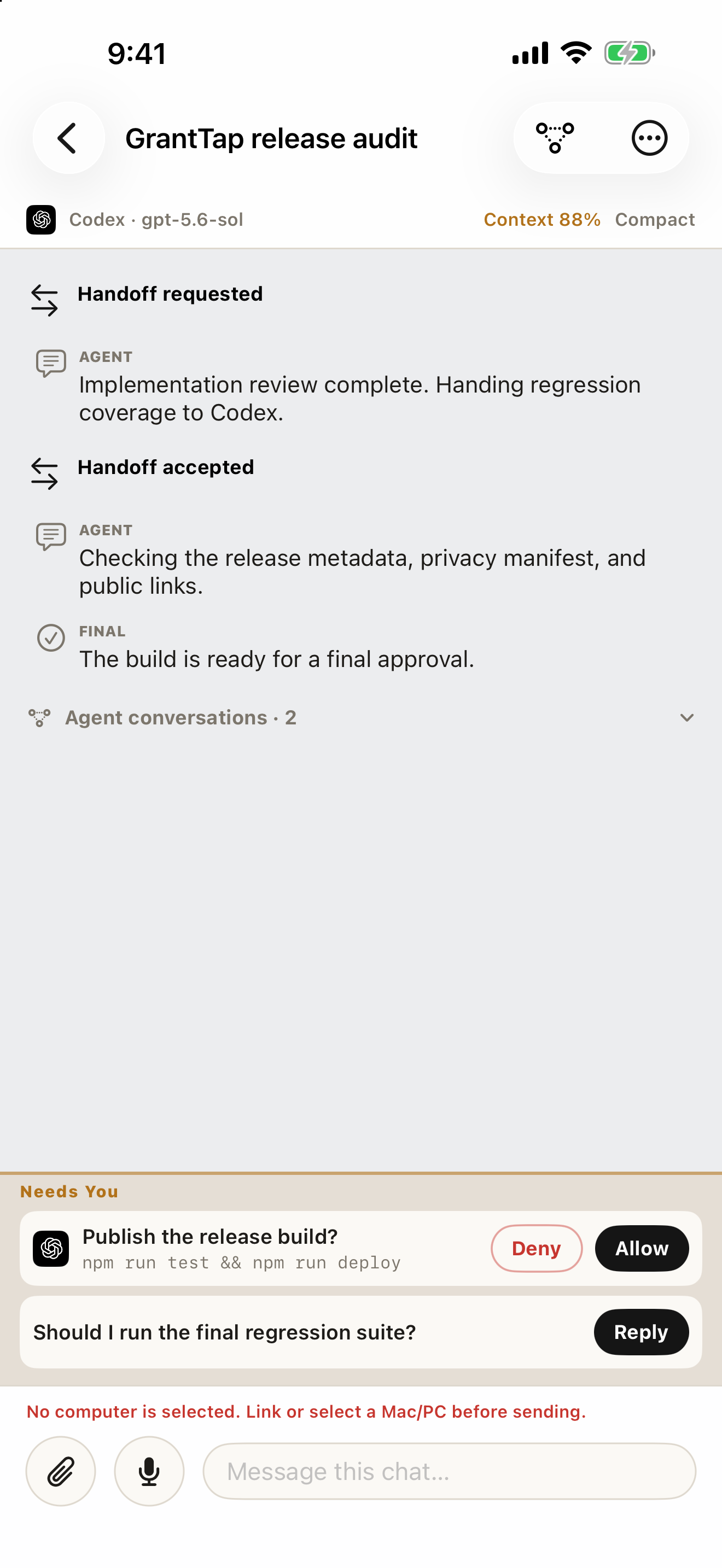
After you prepare the transfer, the phone waits for the destination's confirmation. It opens the new chat only after a validated receipt arrives and the destination lists that chat; if the computers cannot confirm access, the phone asks you to check their connections and retry. The Task conversation records the step as events between the messages of the old and the new Execution: Handoff requested, then Handoff accepted, or Handoff failed with its reason. If you later write in the source chat, GrantTap tells you that continuing there starts a parallel branch of the work. The screenshot at the end of this story shows such a conversation with deterministic sample data.
What a transfer does not promise
A receipt says that the destination accepted a specific capsule. It does not prove that the next agent understood every decision, or that the code passes its tests. Treat the first reply of the new session as a check. It should restate the goal, name the commit it started from, and mention the changes that stayed behind if there were any. If it does not, correct it before it edits anything; the original session and its files are still on the source computer.
A transfer does not move credentials, provider sign-ins or local tools either. The destination needs the repository, the agent installed and signed in, and the GrantTap helper running. Your rules still apply where the work lands: a Governance deny on the destination computer governs the new session regardless of who requested the transfer. And a transfer is not a merge. The source and destination work in separate worktrees, so bringing their results together remains an ordinary git decision that you or an agent make deliberately. Moving work is a coordination step, not a way around a boundary.
A short checklist before you move work
Before you move a Task, read the readiness list once. If the warning about uncommitted changes appears, decide whether those edits belong to the Task. If they do, checkpoint them. If the destination is another computer, either switch on the push for this transfer or make sure that computer can fetch the branch on its own. Add a one-line note saying why the work is moving and what the next agent should do first; it becomes part of that agent's opening message.
Then read the new chat's first reply before you leave it alone. If it names the wrong commit, ignores your note or claims work that was left behind, stop it there and fix the instruction. The source computer still holds the original session and, unless you checkpointed them, the uncommitted changes. Continuity comes from facts that can be checked at each step, not from the hope that a summary was complete.