GrantTap field guide · · 15 min read
Review an agent patch from your phone without losing the evidence
A focused mobile review: identify the Task and Execution, choose the right request, read Modified and All files, inspect tests and distinguish accepted code from a published release.

Reviewing an agent's work from a phone is useful when the question is focused. You may want to see whether a requested change exists, understand why a permission is needed, identify a risky modification, or decide what the agent should do next. The small screen changes how you navigate evidence, but it does not change what makes the evidence convincing. A confident final answer, a file count, and a successful test message establish different facts. A useful review connects those facts to the same task and the same revision.
GrantTap's Files and Agents surfaces can make that connection easier to inspect. Files distinguishes changes recorded for a selected request from the available workspace tree, while Agents presents known child conversations within its supported scope. This article proposes a mobile review method using those controls. It does not claim that reading a patch proves every behavior or that every provider exposes identical history. The archive slot is October 27; the article and product references were prepared and checked on November 5, 2026.
Start with the question the patch must answer
Before opening Files, restate the requested outcome in one or two concrete sentences. For example, an unsent draft must remain editable when storage rejects the submission. This gives the review a purpose beyond counting changed lines. Identify the original user action, the expected transition, and a nearby behavior that must remain intact. The agent's final explanation can help you locate the implementation, but it should not replace the original objective. If the explanation quietly changes the problem from preserving work to showing an error label, the reviewer needs to notice that difference before accepting the result.
A phone is particularly useful for resolving a bounded question and less comfortable for reconstructing an unfamiliar architecture from scratch. Use that fact to choose the scope of the review. You can inspect a targeted patch, ask a precise follow-up, or defer a complicated interaction until a larger screen is available. Deferral should state what remains unchecked, rather than turning a partial look into a full approval. The goal is an informed next decision. There is no requirement to pretend that every review must be completed entirely on the device currently in your hand.

Confirm Task, Execution, provider, and computer
Open the intended Task and check which Execution is being shown. A stable task can have several native conversations after a provider change or transfer. The source computer's patch and the destination computer's current working copy may differ. Confirm the provider, computer, workspace, and relevant request before assigning meaning to a result. A recent response from one execution should not be paired with file changes from another merely because both belong to the same overarching objective. The visual continuity of the task is helpful, but it does not merge independent working copies into one file system.
This check also helps when a chat has been inactive for a while. A retained conversation can show an earlier accepted change alongside a new request that has not reached the computer. Read the delivery state of that new request separately. If the task was transferred, inspect its source confirmation and destination readiness before assuming that the new agent has the latest files. GrantTap's task identity organizes the work; the computer and execution identify where an observed action actually occurred. Keep both levels visible in your review notes so somebody else can locate the same evidence later.
Use the selected request as the first scope
The activity rail reflects a particular part of the conversation. When you move to an earlier pinned request, the available work summary can change with it. Open Files and confirm which request is selected. A file count associated with an old turn is not proof that a new instruction produced changes. Conversely, a new request with no recorded file changes may be waiting, investigating, or using an integration that has not reported a write. Do not force every empty list into the same interpretation. Start with what the source actually reported and what scope the interface says it is displaying.
When the current summary contains a surprising file, compare it with the request that supposedly caused the edit. A retained artifact or a change from another execution may be useful context without belonging to this patch. Ask the agent for the relation if it is unclear. Avoid asking it to repeat the whole task merely to produce a cleaner summary; that can create unnecessary edits and make attribution harder. A focused question about one file often resolves the ambiguity. Good mobile review reduces the amount of material you must inspect while preserving the origin of every important claim.
Distinguish Modified from All files
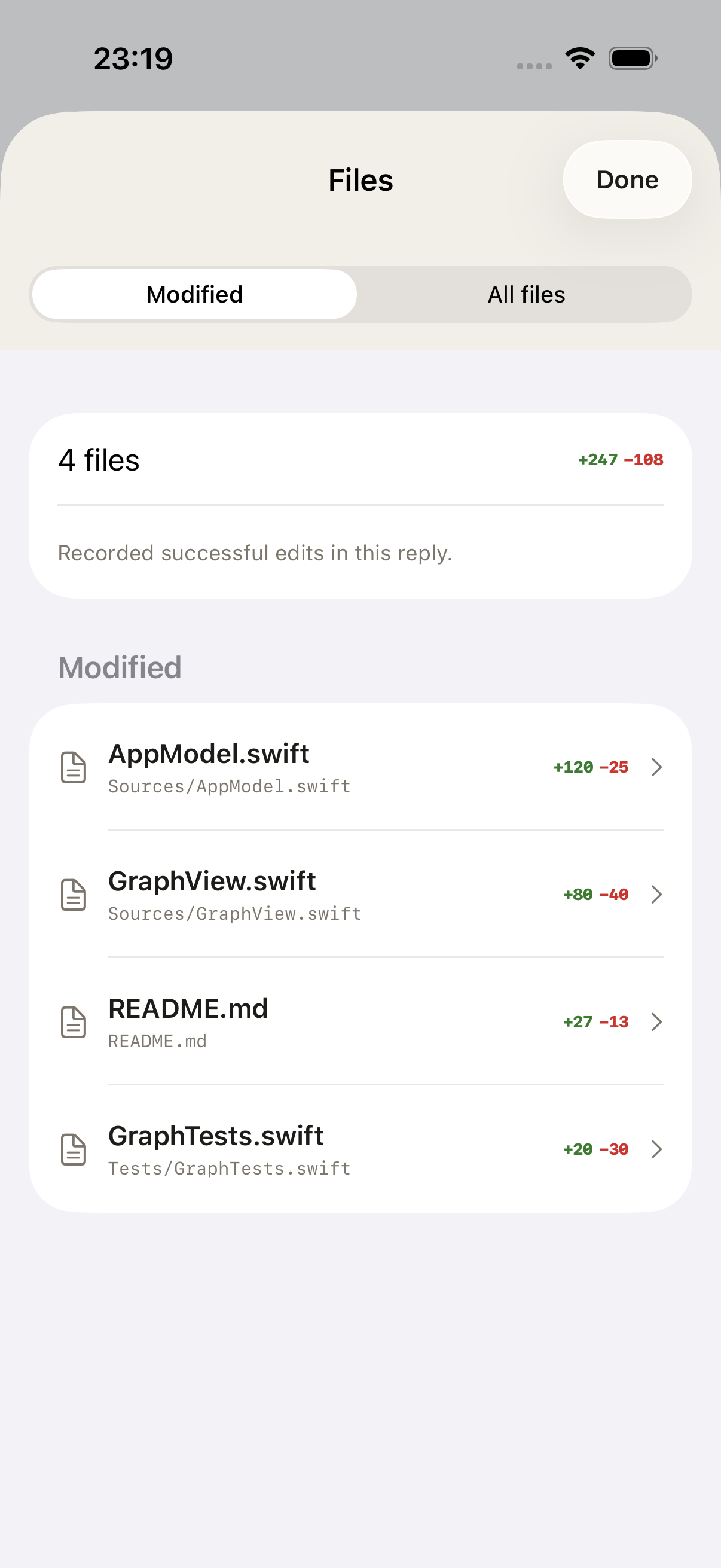
Modified is the place to inspect changes recorded for the selected request. All files shows the available workspace tree, which may include cached or paginated information. These are different questions: what changed for this request, and what files can this workspace expose? A file's presence in the tree does not prove that the agent edited it. Its absence from a partial listing does not prove that it does not exist. Read any labels describing partial data, offline availability, or a preview that has more content to load before drawing a repository-wide conclusion.
Use the tree to understand context when the patch alone is insufficient. You might inspect a neighboring type, a configuration file, or an existing test convention. Keep that context separate from the changed-file record. If a folder is unavailable because its contents were not cached and the computer is offline, treat the result as unavailable rather than empty. Reconnect or use another verified source when the missing content matters to the decision. A patient distinction between unknown and absent is especially important on a phone, where a concise screen can otherwise make incomplete data look deceptively complete.
Read each change for its effect
Open the diff and identify the behavior it changes. Look for the condition, state transition, ownership check, or error path that addresses the original problem. Read the surrounding context before deciding whether a green addition is helpful or a red removal is safe. For a queue change, the significant detail may be preserving an operation identifier across a retry. For a draft repair, it may be the point at which local text is cleared. Neither can be judged reliably from the number of added lines or from a file's reassuring name.
Ask what else can reach the same behavior. A fix in the ordinary send action may leave a notification reply or Retry path unchanged. A check in one view may be bypassed by a background operation. The review does not need to enumerate every hypothetical possibility, but it should inspect plausible alternative entry points relevant to the reported defect. If the agent deliberately limited the patch, preserve that scope. It is better to accept a correctly bounded repair with an explicit follow-up than to label the whole subsystem reliable on the basis of one well-presented diff.
Review tests as part of the patch
Tests are code changes with assumptions and tradeoffs of their own. Read what condition a new test creates and what it actually asserts. A useful regression should fail for the original defect and pass for the intended repair, without simply copying the implementation's current output. If the agent changed an existing expectation, ask whether the product requirement changed or the old assertion was incorrect. Do not accept a weakened assertion merely because it makes the suite green. A test that stops checking the important invariant can hide the very failure the task was supposed to fix.
Check the relation between the test environment and the claim. A unit test can verify an operation state machine without proving physical-device behavior. A Simulator interaction can verify navigation using a fixture without authenticating a real provider. A live service check can confirm an endpoint without checking every client path. These are all useful observations when named accurately. In the review, connect each result to the part of the behavior it covers and leave other parts unresolved. This avoids both dismissing good narrow tests and treating them as comprehensive evidence they were never designed to supply.
Read the final answer as an index to evidence
An agent's final response should help you find the objective, mechanism, changed files, checks, and remaining limitations. Treat it as an index, not as a replacement for those sources. If it says that an update is available on your phone, look for the relevant release or distribution evidence. If it says a message was processed once, find the operation and its observed sequence. If it says a dependency was removed, inspect the manifest and the paths that used it. The most helpful explanation makes those checks easy without requiring a separate investigation of every sentence.
When a claim has no supporting source, ask one concrete follow-up. Request the tested revision, the relevant check result, or the exact file path. Avoid a broad demand for more detail that produces another long narrative without evidence. A missing source may indicate an omission in reporting, a test that could not run, or a mistaken conclusion. The next action depends on which it is. GrantTap can organize conversations and observations, but it does not make every sentence an authenticated statement from the file system or distribution service. The reviewer still needs to connect the claim to its origin.

Use child-agent conversations for unresolved reasoning
Agents can expose known child conversations for the selected request or the whole chat. A child may have investigated one module, reviewed a patch, or supplied a recommendation. Open its available messages when a material conclusion depends on that work. Confirm the scope before crediting it: a reviewer from an earlier turn may not have seen the latest patch. A statement that another agent approved the approach is not equivalent to a current review of the exact revision you are considering. The child conversation can supply useful context while still requiring a link to the changed artifact.
An empty Agents view has several possible explanations. The main agent may have worked alone, the selected request may not include children, or the provider may not expose them in the supported history. Do not interpret emptiness as proof of inactivity or invent a reviewer to fill the space. Tools, operating-system processes, and child model conversations are different entities. A shell command can perform substantial work without creating a subagent. Likewise, a child conversation can provide advice without writing any file. Keep these distinctions when explaining how the patch was produced and what independent review, if any, actually occurred.
Handle a patch that changes during review
Another execution or a person at the computer may edit the working copy while you are reading. A previously inspected diff can then become stale. Keep the revision or change boundary in view when the decision is consequential. If the change is still in progress, prefer a focused question or a request for a bounded review point instead of treating a moving target as final. The appropriate workflow depends on the project, but the underlying requirement is stable: the evidence you inspect and the artifact you accept must refer to the same meaningful state.
After a substantial new edit, revisit the affected part of the patch rather than assuming your earlier inspection still covers it. You do not have to repeat every check when the new change is unrelated, but the reason for limiting the repeat should be clear. A final acceptance note can say which revision or checkpoint was reviewed and which checks correspond to it. This is particularly valuable after a Task transfer, because the destination may introduce a new working tree. A shared task title cannot substitute for the identity of the code that actually passed the relevant scenario.
Keep approval, merge, and publication separate
Approving a proposed command grants a particular action under the effective policy. It is not a blanket acceptance of the resulting software. Reviewing a diff does not merge it. A merge does not publish an application. An uploaded application may still be processing, and a running candidate service may not be the publicly routed instance. These distinctions explain many situations in which the agent says finished but the user cannot see a change. The review should identify which stage has actually been reached and what evidence is needed for the next stage of the delivery path.
For a web change, inspect the public route or a clearly identified candidate, according to the task's scope. For an application, connect the source to the distribution artifact and the intended tester group. If the article's screenshot shows an older build, its caption should retain that build rather than being silently relabeled. GrantTap's own screenshots follow that provenance rule. Use the same habit when sharing your project's evidence. A picture can demonstrate an interface state, but it does not establish that every user has received the corresponding release or that all promised checks were completed.
Give feedback the agent can act on
A useful review comment names the observed problem, its implication, and a concrete next check. For example, the error label is present, but the draft still clears before the storage result, so the rejection scenario remains unresolved. This is more actionable than saying the patch is wrong or asking the agent to make everything better. Keep the feedback tied to the original acceptance condition. If you introduce a new product requirement, say so; otherwise the agent may try to satisfy an expanding target without understanding why the definition of completion keeps changing.
You can also accept part of the work. State which behavior is verified and which specific limitation remains. That gives the next execution a stable starting point and preserves the value of a correct partial change. Avoid asking for unrelated polish in the same breath as a correctness repair unless the work genuinely belongs together. A small, focused follow-up is easier to review from a phone and easier to associate with its own Files scope. The conversation becomes a sequence of understandable decisions rather than a repeated cycle of broad dissatisfaction and increasingly large patches.
Protect private material in review notes
A screenshot of a diff can contain credentials, personal paths, customer data, or an unpublished endpoint. Before forwarding it, inspect the content and the surrounding chrome. A synthetic example or a sanitized excerpt may explain the issue without exposing the real value. Do not copy an entire configuration file into a review comment to point out one line. The same caution applies to provider authorization codes and pairing QR screens. A local display of a secret does not make it suitable for distribution through every channel involved in the development process.
Keep useful provenance while removing unnecessary private data. A report can identify the type of file, the relevant behavior, and the tested revision without publishing its confidential contents. If a shared report needs an identifier, choose a scoped reference that the intended reviewer can resolve. The objective is to make verification possible for the right person, not to maximize the amount of raw history attached to every message. GrantTap's encrypted transport and local cache have specific roles; they do not remove the need to choose carefully what you export or send to somebody else.
Try a complete review on a harmless sample
Use a small sample task with a clear acceptance condition. After the agent responds, open the Task, confirm the Execution and computer, select the intended request, and inspect Modified. Open one changed file and explain its effect in your own words. Then look at the related test or check result. If a child conversation is reported, inspect what it actually reviewed. Finally, write a short acceptance note that names the result, the evidence, and any unresolved condition. This sequence is a proposed practice exercise, not a report of a live test performed for this article.
The exercise succeeds when another person can follow your note back to the same patch and understand the decision without watching the original chat. If that is difficult, improve the scope or the record before making the task more complicated. Mobile review is most valuable when it makes the next decision clear: continue, adjust one thing, obtain one missing check, or accept a particular verified state. It does not require trusting an agent's confidence or reading every line on a small screen. It requires a reliable connection between the request, the change, the check, and the outcome you are willing to accept.